
DesignAround searches published design patents in the US, China and Europe, compares them with your product the way an ordinary observer would, and helps you change the design until it stands apart. Then it prepares patent drawings and a filing package for your own application.
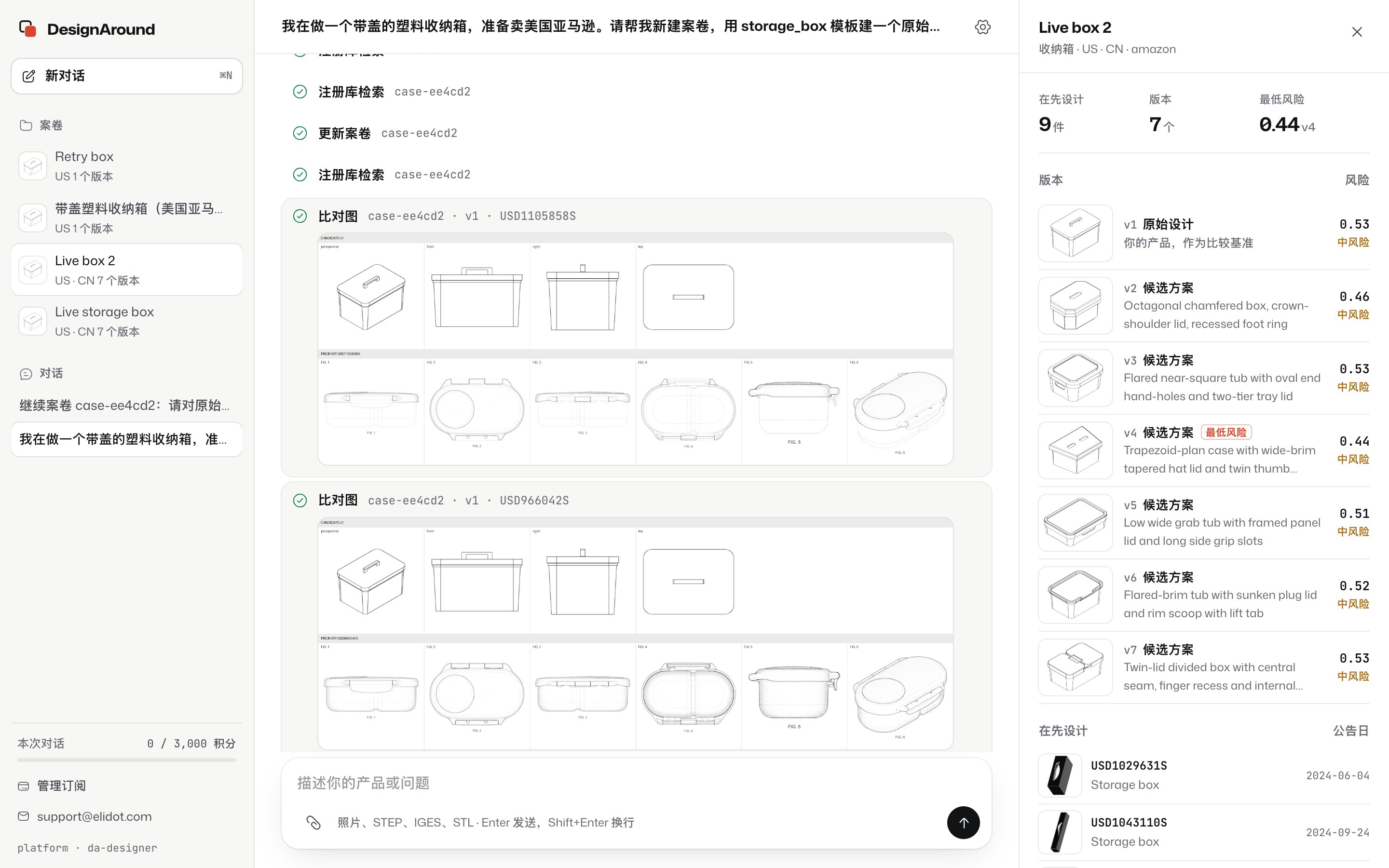
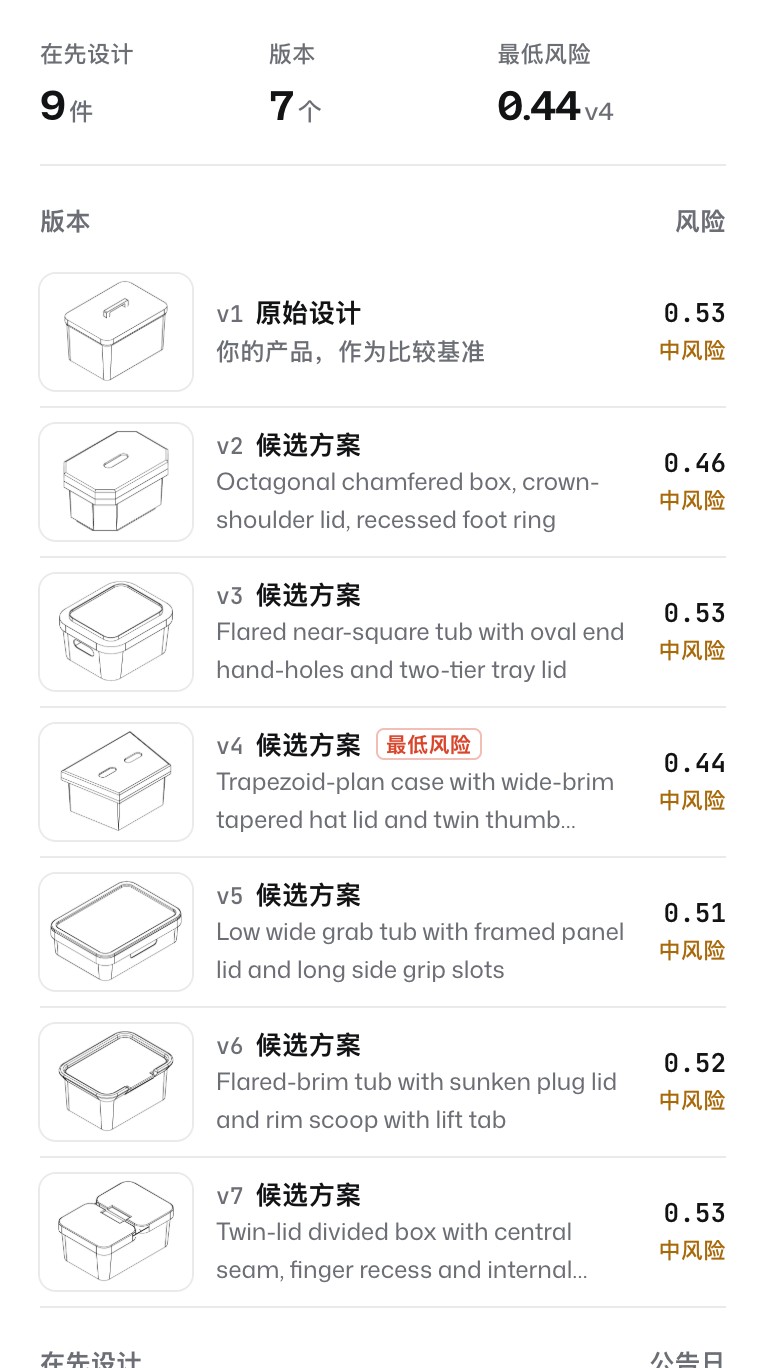
The workbench on a real case: a quick screen found 9 published US designs for a lidded storage box, and the case panel compares 7 versions against them. Shown with the Chinese interface.
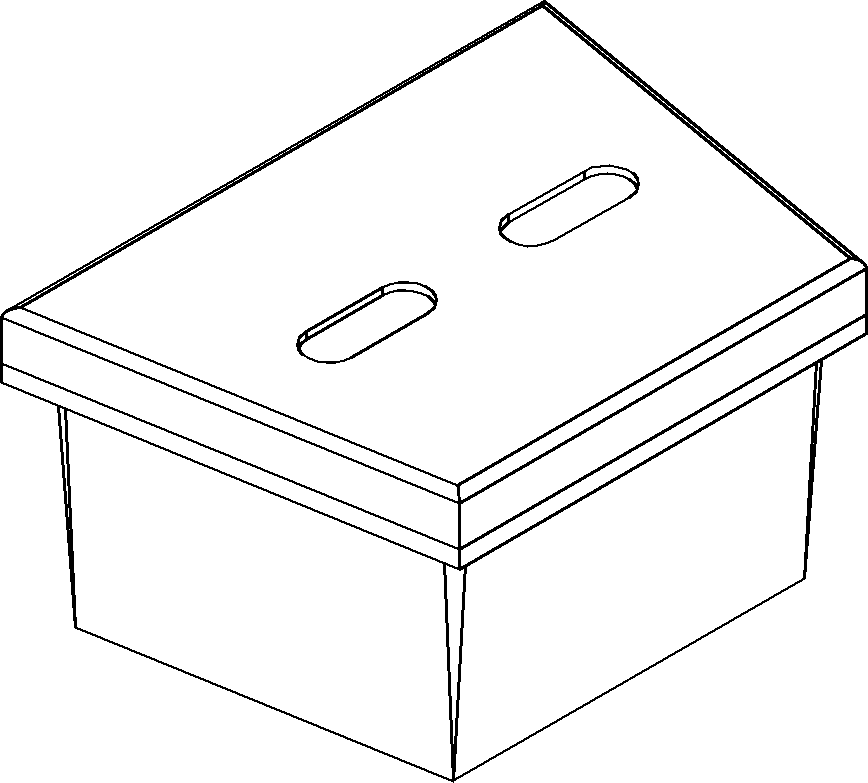
Drag to turn the seven versions of the example case. Line mode shows the edges the patent drawings are made from.
Risk combines the observer's judgments with shape similarity to the closest prior art; lower is further away. All seven versions of this case are still in the medium band, so the work would continue.
How it works
Each product is a case on your machine. It holds the model, the prior art found, every candidate design and a hash-chained evidence log of what was done and when.
Describe a new product and get distinct 2D concepts, each checked by an independent reviewer; the one you pick is built in 3D from scratch. Or start from your own STEP or IGES file, or labelled photos. DesignAround searches US design patents through the USPTO, and Chinese and European design documents through Google Patents and Espacenet, then ranks the results against your model on your machine.
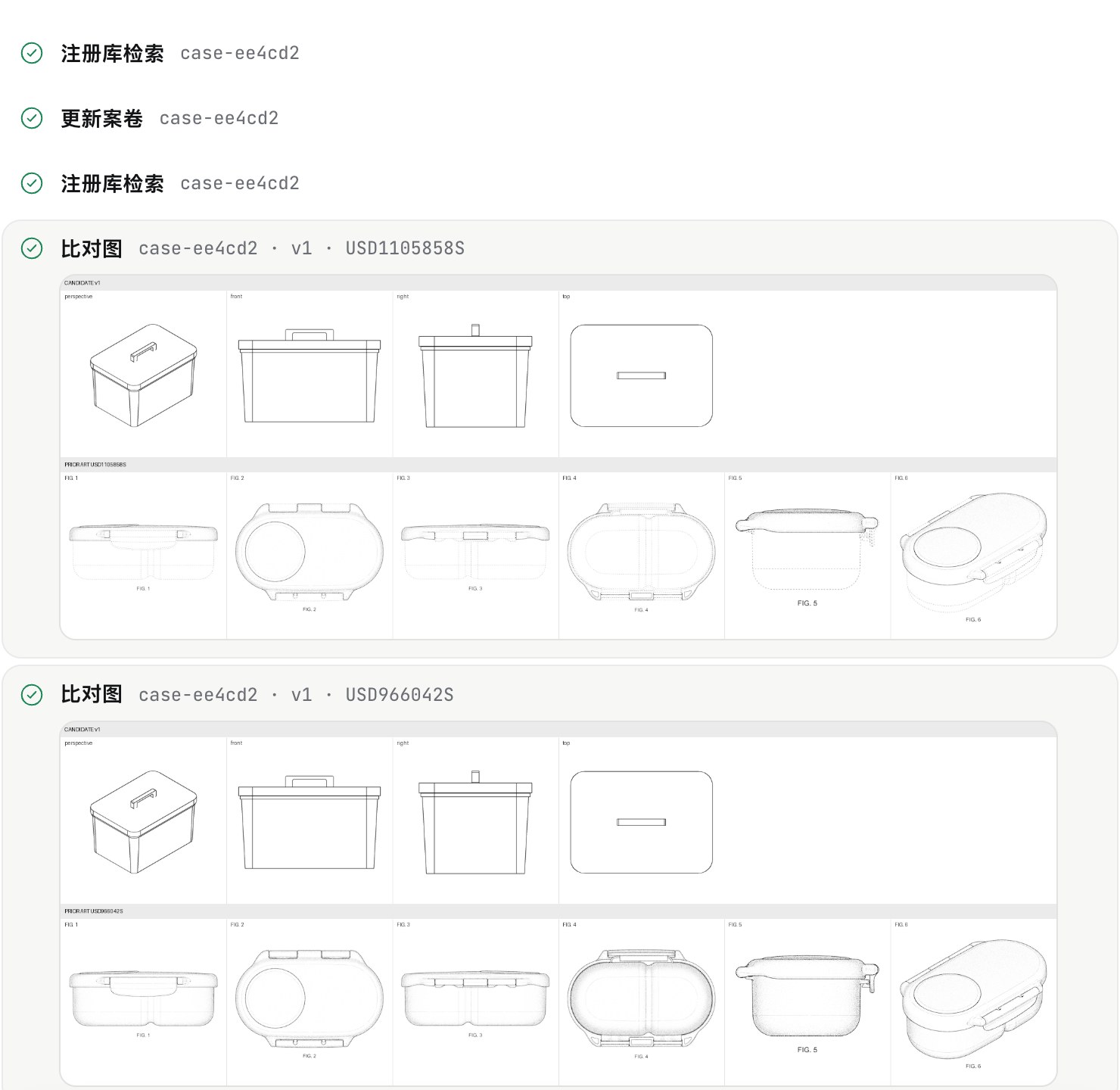
A separate observer model sees only the two designs and a fixed rubric, and scores visual similarity from 0 to 10 with reasons. The Designer agent proposes changes to the model; originality and manufacturability checks reject weak candidates, and you pick the version to take forward.
DesignAround renders the views each office expects from the CAD geometry and checks them against the office's drawing rules before you hand anything over. US sheets can include surface shading; Chinese packs can include similar-design variants. A filing package adds the specification text, the forms checklist, IDS rows for US filings and a record of the human contribution.
Everything in the case
Each step below is a command in the CLI, a tool for the Assistant in the workbench, and most are tools in the MCP server too.
Quick screens (50 credits; the first 5 each month are free), deep screens with image search (350 credits), and batch screens from a CSV that resume where they stopped. A re-screen repeats a search with its original parameters and lists new and dropped designs; monitoring repeats it on a schedule and pushes new hits to a chat-bot webhook or a desktop notification.
Quick, standard and deep runs (1, 3 or 6 rounds, capped at 2,900, 5,900 and 14,900 credits). If a standard or deep run ends without a qualified candidate, half of the credits it spent are refunded automatically. Long runs go to the background and notify you when they finish.
2D concepts drawn from your requirements and built in CAD by the CAD Agent, then checked by a reviewer from a different model family; your STEP, IGES or BREP file; meshes and 3D scans (STL, OBJ, GLB/glTF, PLY, 3MF), repaired on import; or labelled product photos.
US, CN and EU packages with drawings, specification text, forms checklist, IDS rows and the human-contribution record; similar-design variants for China; view packs straight from product photos; and frozen submission baselines (SHA-256) to compare later versions against.
Record filings and official notices. The calendar lists the 6-month priority period, grace periods, office-action replies, the US issue fee, CN annual fees, EU renewals and Hague milestones with their legal basis, and exports an .ics file with reminders 30, 14, 7 and 1 days ahead.
Intake identifies the right and the channel: Amazon's APEX process handles US utility patents, not design patents, and a lawsuit's answer is due 21 days after service. The response pack for your attorney holds a three-way comparison, the earlier-design search record, your design timeline and an appeal draft.
Read-only links with the recipient's watermark, valid for 1 to 30 days, with an access log; revoke one at any time and its files are deleted from our server. Prototype packs hold STEP, STL and 3MF files with a Chinese PDF summary for the factory.
A decision card (proceed, redesign or abandon, with the cost and time of each next step), a risk report PDF in English or Chinese, a hash-chained evidence log with server timestamp receipts, and practitioner review gates that record the reviewer's name, registration number and decision.
designaround sample creates a sample case with illustrative data, so you can walk through screening, design-around, drawings and the filing package for free. The workbench switches between English and Chinese.
Sellers on Amazon, Temu, TikTok Shop and similar marketplaces who launch physical products. A design-patent complaint can take a listing down; checking before launch costs far less than responding afterwards.
Teams that develop new versions of everyday products and want to know early whether a shape is already protected, and what to change.
Attorneys and agents who review the screening, the comparison and the filing package. DesignAround records their review and sign-off in the case evidence.
Choose where the AI models run: platform (our hosted models, metered in credits), bring your own key (no model credits), or host (your agent host supplies the model).
For macOS (Apple silicon and Intel), Windows 10 and 11, and Linux (.deb and .rpm). It bundles the CAD engine, the Assistant and its agent runtime, creates a free account on first launch and opens the workbench. Download
designaround ui opens a local chat window. You describe the product, and the DesignAround Assistant runs the steps and asks before anything that costs credits.
designaround chat for a conversation in the terminal, or more than 100 single commands such as designaround screen with human or JSON output for scripts and CI.
designaround skill install claude-code adds the Skill to your agent host, which then drives the CLI. Also for Codex, Cursor, Gemini CLI, OpenCode, OpenClaw and Kiro.
designaround mcp serves 7 tools over stdio to any MCP client: case_list, decision_card, screen, design_around, run_status, viewpack and compare. Paid tools require a credit cap.
Paid steps show their price first and stop at the cap you set. Agents never complete payments: checkout returns a link that a person opens and pays.
~/.designaround.DesignAround is software for product sellers and designers. It checks a product's appearance against published design patents in the US, China and Europe, helps change the design until it is visibly different, and prepares patent drawings and a filing package for your own application. It runs on your computer as a desktop app, a CLI, a chat workbench, an agent Skill and an MCP server. It is made by Shanghai Qidianyan Technology Co., Ltd.
No software can decide that; a court decides infringement, and a patent attorney can give an opinion. DesignAround gives a risk level from an ordinary-observer comparison with the closest designs it found, explains the reasons and lists what the search could not cover, so you know what to change and what to take to an attorney.
US design patents through the USPTO's official search, Chinese design patents through Google Patents, and European designs through Google Patents. A deep screen adds more sources (Google Patents for US designs, Espacenet for European designs) and an image-based search. US design applications are not published before they are granted, so no tool can find pending US designs.
The Designer agent changes the parameters of the CAD model. Each candidate must change the features that drive the similarity (originality check), stay manufacturable (wall thickness, draft, undercuts) and get a lower score from an isolated observer model that never sees the designer's reasoning. You choose which version to take forward.
The local engine is free. The Free plan includes 1,500 starter credits once and 5 quick screens a month. Pro is US$59 a month (or US$590 a year) with 10,000 credits a month, drawings without watermark and filing packages; Team is US$189 a month. One credit is about US$0.01; a quick screen is 50 credits and a deep screen 350.
No. It is software, not a law firm. It prepares the drawings and the filing package; a registered patent attorney or agent you choose reviews and files them, and you pay their fees and the office fees directly to them.
Yes. designaround skill install claude-code installs the Skill (also for Codex, Cursor, Gemini CLI, OpenCode, OpenClaw and Kiro), and designaround mcp runs an MCP server with 7 tools for any MCP client. Paid tools need a credit cap.
Amazon's APEX evaluation is only for US utility patents, so a design-patent complaint goes through a retraction request, an appeal with evidence, a changed product or a lawsuit. DesignAround records the complaint, puts the deadlines in your calendar and prepares a response pack for your attorney. Read the guide
On your computer, in ~/.designaround. Our server only receives what a server step needs: the search text and image for a screen, model prompts when you use our hosted models, hash values for evidence anchoring, and the files you put in a share link.
Download the desktop app, describe your product to the Assistant, and run a quick screen. To learn the method first, read how to check a product for design patents before you sell it.
The local engine is free. New accounts get 1,500 starter credits and five quick screens every month. Pro is US$59 per month.